Transfer your domain to Host Africa effortlessly
Learn how to transfer your domain name, website and email to a different host.
Our customers say Excellent

4.8 out of 5 stars based on 2446 reviews


Transfer Your Domain to HOSTAFRICA in just a few clicks
You’ve spent years building a personal blog on a domain you bought on a whim. Now, you’ve outgrown your current provider’s limitations and need more features, better pricing, or superior support. Naturally, you’re leaning towards HOSTAFRICA. But how do you transfer a domain in a way that doesn’t disrupt your online presence? Don’t worry, the domain transfer process exists for precisely these scenarios. It enables a seamless move to a new registrar, and in this guide, we’ll provide step-by-step instructions on how to transfer a domain.

Why Should You Transfer Your Domain to HOSTAFRICA
Here’s a few reasons why you may be looking to transfer your domain:
Cost
Domain registrars can sometimes increase renewal fees out of the blue. Transferring to a registrar with a more competitive rate can save you a lot of money in the long run.

Features
Not all registrars offer the same features. As your site grows, you may need additional features, like better security, automated backups, and advanced domain management tools. This could prompt a transfer.

Customer Service
You may be unhappy with the customer service provided by your current registrar, and looking to move to one that’s known for its responsive and helpful support team.

Consolidation
If you have multiple domains registered with different providers, it’s a good idea to consolidate them under one registrar, as it can simplify management and billing.

Downtime
If you experienced downtime due to a cyberattack or a technical glitch with your current registrar, it may be a sign that their infrastructure isn’t reliable. This is a very solid reason to transfer a domain.

What do you get when you transfer your domain to HOSTAFRICA

Simple domain set up with no technical skills needed.

Up to 100 subdomains to customize your site.

Real-time monitoring to make sure that you’re always up and running.

Simple tools to forward your domains to any existing website.
Preparations Before Transferring Your Domain to HOSTAFRICA
Not all domains are transferable immediately. Most registrars require the domain to be at least 60 days old from the initial registration date and not currently in a transfer lock status. To confirm if your domain qualifies for transfer, log in to your domain management panel or contact the support team of your current registrar.
Not all domains are transferable immediately. Most registrars require the domain to be at least 60 days old from the initial registration date and not currently in a transfer lock status. To confirm if your domain qualifies for transfer, log in to your domain management panel or contact the support team of your current registrar.
Not all domains are transferable immediately. Most registrars require the domain to be at least 60 days old from the initial registration date and not currently in a transfer lock status. To confirm if your domain qualifies for transfer, log in to your domain management panel or contact the support team of your current registrar.
Not all domains are transferable immediately. Most registrars require the domain to be at least 60 days old from the initial registration date and not currently in a transfer lock status. To confirm if your domain qualifies for transfer, log in to your domain management panel or contact the support team of your current registrar.
Not all domains are transferable immediately. Most registrars require the domain to be at least 60 days old from the initial registration date and not currently in a transfer lock status. To confirm if your domain qualifies for transfer, log in to your domain management panel or contact the support team of your current registrar.

Special Registration & Transfer Requirements
Kenya
Note that domains under .ac.ke and .sc.ke require official documentation from the Ministry of Education.
Before completing an order you’ll need the supporting documents:
-
.ac.ke – For tertiary institutions only (Universities, Colleges, Polytechnics, Technical Institutes)
-
.sc.ke – For basic education institutions only (Kindergarten, Primary, Secondary Schools)
To activate the domain name, please email us a scanned copy of a certificate from the Ministry of Education to support@hostafrica.com.
Nigeria
For .edu.ng (educational institutions) or .gov.ng (government departments) domain names with NIRA (Nigeria Internet Registration Association), you need to provide specific documentation and authorization.
For .edu.ng, this includes proof of accreditation and a letter of authorization from the institution. For .gov.ng, a similar authorization letter from the relevant government agency or ministry is required.
These domains also require similar documentation:
-
.net.ng
-
.sch.ng
-
.mil.ng
How to Transfer a Domain
With the prerequisites in order, we are ready to explore how to transfer a domain to someone else. For this guide, we will share the steps to transfer a domain to HOSTAFRICA. Note that the steps may vary slightly depending on your registrar, but the overall process is similar.
-
Login to your HOSTAFRICA client account.

-
Select “Domains” from the navigation bar and click “Transfer Domains to Us”.

-
Enter the name of the domain you wish to transfer and search.

-
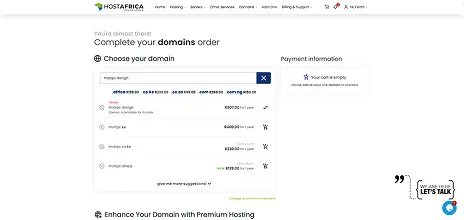
The system will now check the status of the domain. If the domain is available for transfer, you should see it in the results as “Taken”, along with a “TRANSFER DOMAIN” button. See below:
-
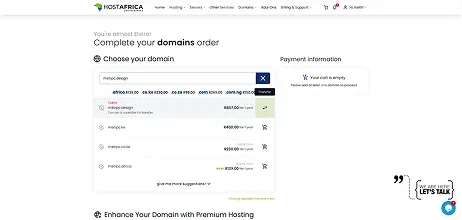
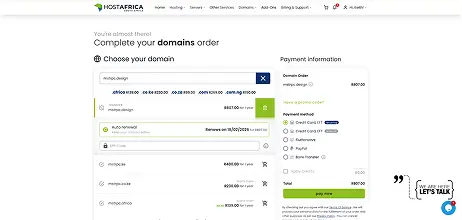
Double-check the domain details to ensure that everything is correct. Then, click “TRANSFER DOMAIN” to see more details about the transfer, including the applicable price and the EPP code. Toggle the “Auto-renew” button as needed, choose whether you want domain warranty and privacy, and enter the EPP code that you obtained in the last section.
-
Double check all the data in the “Payment information” section and then click “pay now”.
-
Once the payment has been processed, HOSTAFRICA will initiate the transfer.
-
You’ll receive an email from your current registrar asking you to approve the transfer. Follow the instructions to approve it.
Steps to Take After Transfer
Once your domain transfer is complete, there are several important steps that you should take to ensure that everything is set up correctly:
Verify Transfer Completion
Login to your HOSTAAFRICA account and verify that the domain transfer is complete. Also, perform a WHOIS lookup to verify that the registrar information has been updated to the new registrar.
Update DNS Settings
Update or reconfigure your DNS settings as needed to guarantee that your website and email services function correctly. This may include updating A records, CNAME records, and MX records, etc. Remember that DNS changes may take some time to propagate across the internet (usually up to 48 hours).

set up automatic renewal with HOSTAFRICA
Set up automatic renewal with the new registrar to avoid the risk of your domain expiring, and potentially becoming available for registration by someone else.
Monitor Performance
Periodically check your website’s performance and availability. If you notice any issues, address them timely by making the needed tweaks, or by contacting our support.
Enable Domain Lock and Privacy Protection
For added security, consider enabling the domain lock feature to prevent unauthorized transfers. If desired, you may also enable privacy protection to keep your WHOIS information private.

We host all our clients’ sites with HostAfrica Ghana. Great uptime and a team that truly gets the local tech space.
— Isaac Tetteh
I used to struggle with support from overseas providers. Now I just call a local number and get help in minutes.
— Yaw Kwaku Sarpong
As a fashion entrepreneur in Kumasi, having fast, local hosting has made my online store so much more reliable.
— Maame Serwaa Opoku
We host all our clients’ sites with HostAfrica Ghana. Great uptime and a team that truly gets the local tech space.
— Isaac Tetteh
I used to struggle with support from overseas providers. Now I just call a local number and get help in minutes.
— Yaw Kwaku Sarpong
As a fashion entrepreneur in Kumasi, having fast, local hosting has made my online store so much more reliable.
— Maame Serwaa Opoku
Quick answers to your hosting queries
Got questions? We’ve got answers! Dive into our FAQ section for insights and information on our email hosting services.
This is the first item’s accordion body. It is shown by default, until the collapse plugin adds the appropriate classes that we use to style each element. These classes control the overall appearance, as well as the showing and hiding via CSS transitions. You can modify any of this with custom CSS or overriding our default variables. It’s also worth noting that just about any HTML can go within the .accordion-body, though the transition does limit overflow.
This is the first item’s accordion body. It is shown by default, until the collapse plugin adds the appropriate classes that we use to style each element. These classes control the overall appearance, as well as the showing and hiding via CSS transitions. You can modify any of this with custom CSS or overriding our default variables. It’s also worth noting that just about any HTML can go within the .accordion-body, though the transition does limit overflow.
This is the first item’s accordion body. It is shown by default, until the collapse plugin adds the appropriate classes that we use to style each element. These classes control the overall appearance, as well as the showing and hiding via CSS transitions. You can modify any of this with custom CSS or overriding our default variables. It’s also worth noting that just about any HTML can go within the .accordion-body, though the transition does limit overflow.
This is the first item’s accordion body. It is shown by default, until the collapse plugin adds the appropriate classes that we use to style each element. These classes control the overall appearance, as well as the showing and hiding via CSS transitions. You can modify any of this with custom CSS or overriding our default variables. It’s also worth noting that just about any HTML can go within the .accordion-body, though the transition does limit overflow.
This is the first item’s accordion body. It is shown by default, until the collapse plugin adds the appropriate classes that we use to style each element. These classes control the overall appearance, as well as the showing and hiding via CSS transitions. You can modify any of this with custom CSS or overriding our default variables. It’s also worth noting that just about any HTML can go within the .accordion-body, though the transition does limit overflow.
This is the first item’s accordion body. It is shown by default, until the collapse plugin adds the appropriate classes that we use to style each element. These classes control the overall appearance, as well as the showing and hiding via CSS transitions. You can modify any of this with custom CSS or overriding our default variables. It’s also worth noting that just about any HTML can go within the .accordion-body, though the transition does limit overflow.
This is the first item’s accordion body. It is shown by default, until the collapse plugin adds the appropriate classes that we use to style each element. These classes control the overall appearance, as well as the showing and hiding via CSS transitions. You can modify any of this with custom CSS or overriding our default variables. It’s also worth noting that just about any HTML can go within the .accordion-body, though the transition does limit overflow.
This is the first item’s accordion body. It is shown by default, until the collapse plugin adds the appropriate classes that we use to style each element. These classes control the overall appearance, as well as the showing and hiding via CSS transitions. You can modify any of this with custom CSS or overriding our default variables. It’s also worth noting that just about any HTML can go within the .accordion-body, though the transition does limit overflow.
This is the first item’s accordion body. It is shown by default, until the collapse plugin adds the appropriate classes that we use to style each element. These classes control the overall appearance, as well as the showing and hiding via CSS transitions. You can modify any of this with custom CSS or overriding our default variables. It’s also worth noting that just about any HTML can go within the .accordion-body, though the transition does limit overflow.
This is the first item’s accordion body. It is shown by default, until the collapse plugin adds the appropriate classes that we use to style each element. These classes control the overall appearance, as well as the showing and hiding via CSS transitions. You can modify any of this with custom CSS or overriding our default variables. It’s also worth noting that just about any HTML can go within the .accordion-body, though the transition does limit overflow.
Our latest blogs



Need Assistance?
Our local Ghanaian support team
is ready to help.