How to Restore a Full Account Backup From cPanel JetBackup5

New Introduction (replaces the original and flows naturally into: “How to restore a full account backup.”)
Backing up your website isn’t just a best practice—it’s a safety net. Whether you’re running a business site, blog, or e-commerce platform in Ghana, regular backups ensure you can quickly recover from unexpected issues like hacks, data loss, or plugin failures. With JetBackup5 in cPanel, restoring a full account backup is simple, fast, and reliable.
At HOSTAFRICA, we’ve automated this process by creating daily and monthly backups of your hosting account, so you’re never left stranded. Even though we’ve upgraded to Acronis Backups, the steps to restore older backups via JetBackup5 remain the same.
Note: We’ve since switched to Acronis Backups, however, the process for restoring your backups will be the same.
How to restore a full account backup.
To do this, first login to your cPanel account. Go to > File > Jetbackup5.

Next it will take you to the JetBackup5 Dashboard within the cPanel where you’ll see things like, total disk usage, number of backups, download or restore backup options etc.

Here jetbackup provides you with several options, you can choose to restore or download a full account backup, Home Directory backup, cron jobs, database backup, database user, DNS zones, SSL certificates, email accounts and FTP account backups.
But since we want to restore a full account backup lets go ahead with the full account backup option.
To do this, just click on full backups and a new screen with appear with all the number of daily backups, size and date created, to restore a backup click on the one you wish to restore.
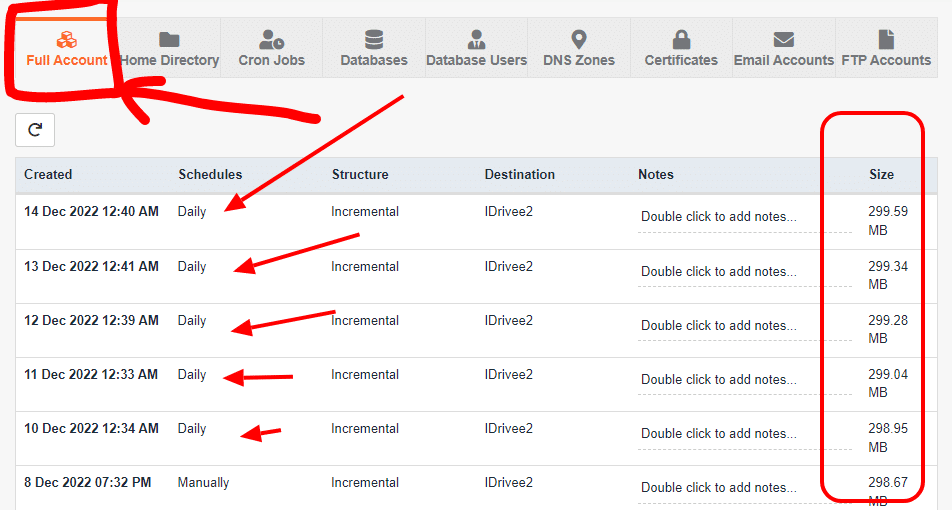
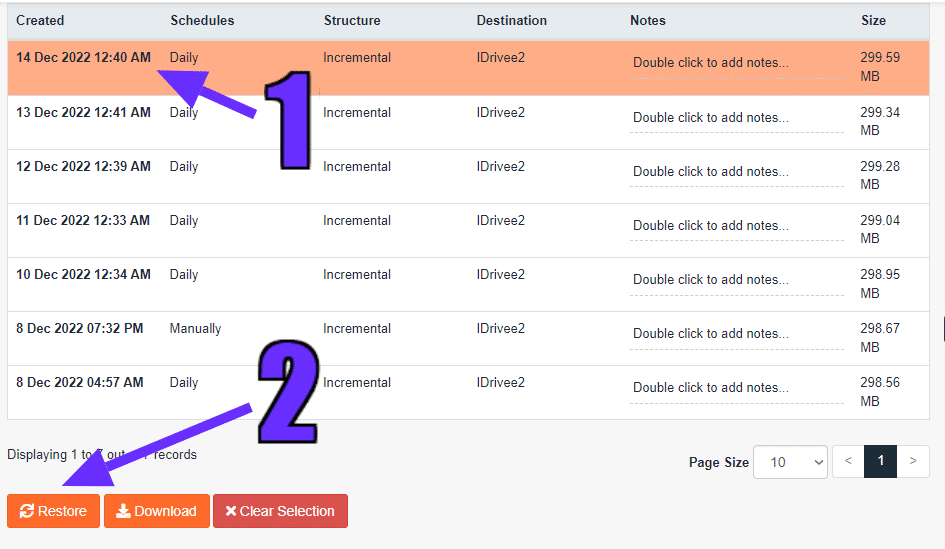
Lets Say we want to restore the most recent backup here which is 14 Dec 2022 12:40 AM, just click on it and a option will appear below the backups, (Restore, download and clear selection). for this we’ll select restore since we want to restore a backup of our website.
Another screen will pop giving you options to exclude some items from the action, but since we want a full account restore we’ll ignore it and proceed with the process of restoring the backup.
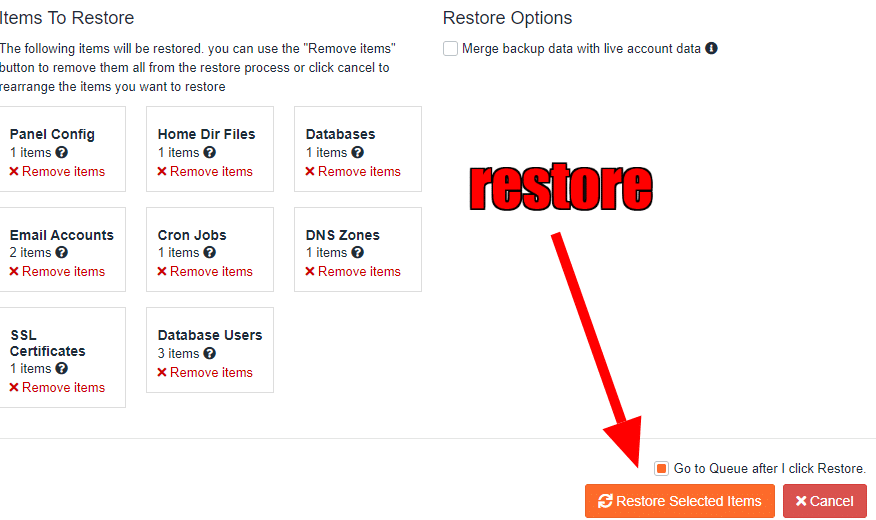
To proceed, just click on restore selected items and in some seconds the process should begin you can check the Queue to see the list of jobs.
If your hosting provider doesn’t offer you free website backups then maybe its time you switch to us to enjoy this and many other benefits.

Ashwin S.
The Author
Ashwin is a content specialist at HOSTAFRICA, where he's been crafting clear, authoritative copy since 2021. With a background in digital marketing and a passion for impactful storytelling, he turns complex ideas into trustworthy, engaging content. Ashwin writing helps our audience navigate web hosting and cloud solutions with confidence.
Related posts



Need Assistance?
Our local Ghanaian support team
is ready to help.